

If you’ve had an email this week from your IT company or web host about a “critical PHP vulnerability”, you’re not alone. Some of those emails are helpful. Some are a sales pitch. This guide explains what actually happened, in plain English, and what it means for a typical business website.
The short version: PHP2Shell is serious, but the fix is an update your host should already have installed. It is not, on its own, a reason to pay more for security.
- Two flaws in PHP itself (CVE-2026-109618 and CVE-2026-109619) let an attacker run code on a web server without logging in.
- PHP released fixed versions on 21 October 2026: 8.2.35, 8.3.36, 8.4.27 and 8.5.12.
- WordPress updates and security plugins can’t fix this. Only updating PHP on the server can.
- Sites on old, unsupported PHP (8.1 and earlier) are the ones genuinely at risk.
What is PHP, and why does it matter?
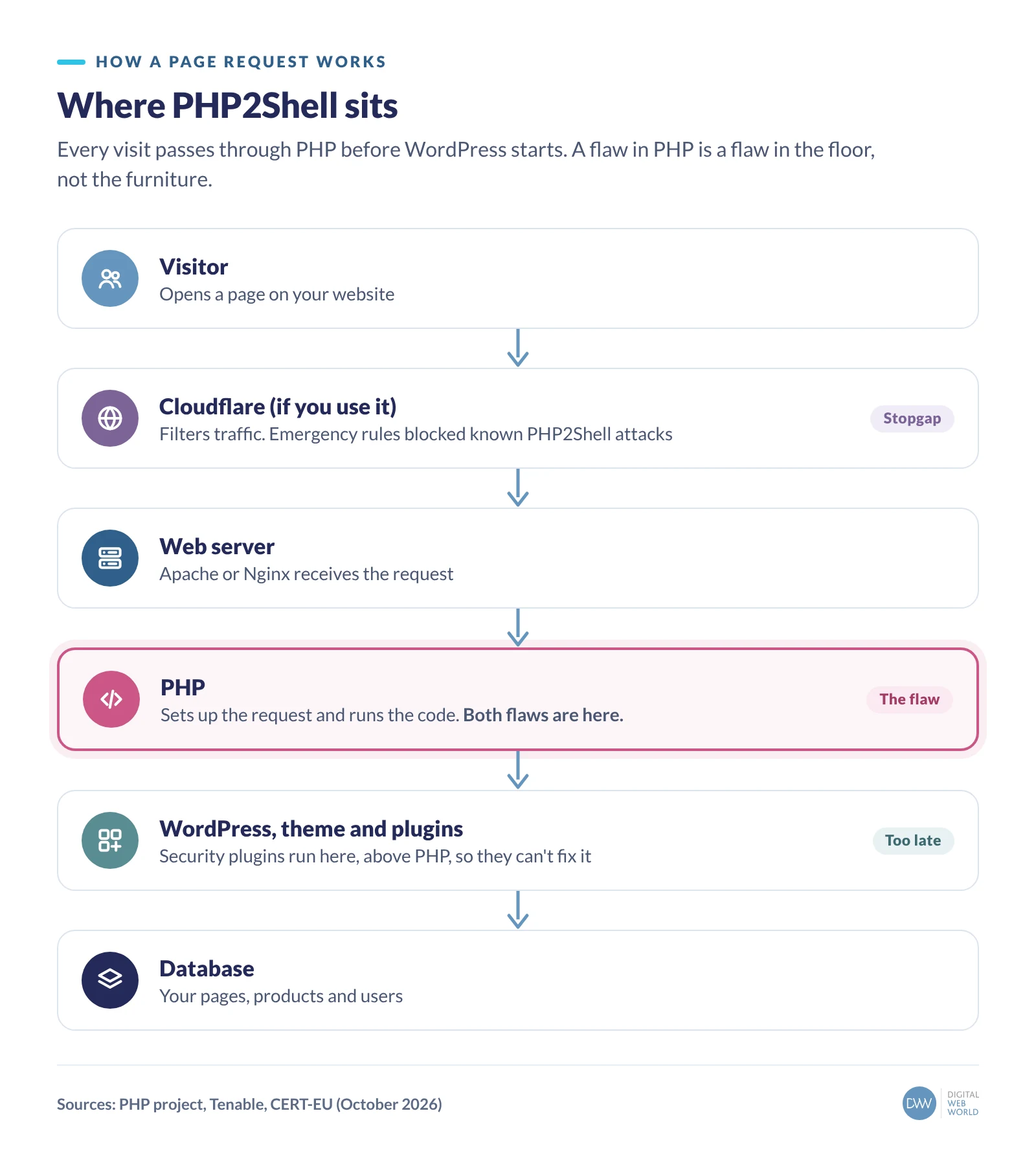
PHP is the programming language that runs WordPress, and a large share of the web with it. Every time someone visits a WordPress page, the web server hands the request to a PHP “worker”, which runs WordPress, pulls content from the database and builds the page.
Because PHP sits underneath WordPress, a flaw in PHP is a flaw in the floor, not the furniture. It doesn’t matter how carefully you’ve chosen your plugins.
What actually went wrong?
Researchers found two separate bugs in how PHP manages memory while it handles a request. Both are rated 9.2 out of 10 by the PHP project. (A score of 10 circulated early on, but PHP says that was wrong.)
- The half-built request (CVE-2026-109618). If PHP runs out of memory while it’s still setting up a request, the clean-up code can treat the half-built data as if it were complete. An attacker can shape that leftover memory and use it to run their own code.
- The leftover memory (CVE-2026-109619). Information from one request can survive after its memory has been freed. The next request handled by the same worker may use it before it’s reset, which again gives an attacker a way in.

The part that makes security people nervous is that neither flaw needs a password, and on some server set-ups (Apache with mod_php in particular) the attack can land before WordPress has even started. Researchers have shown it working against WordPress, Drupal, Joomla and Magento sites running on vulnerable PHP versions.
How did it unfold?
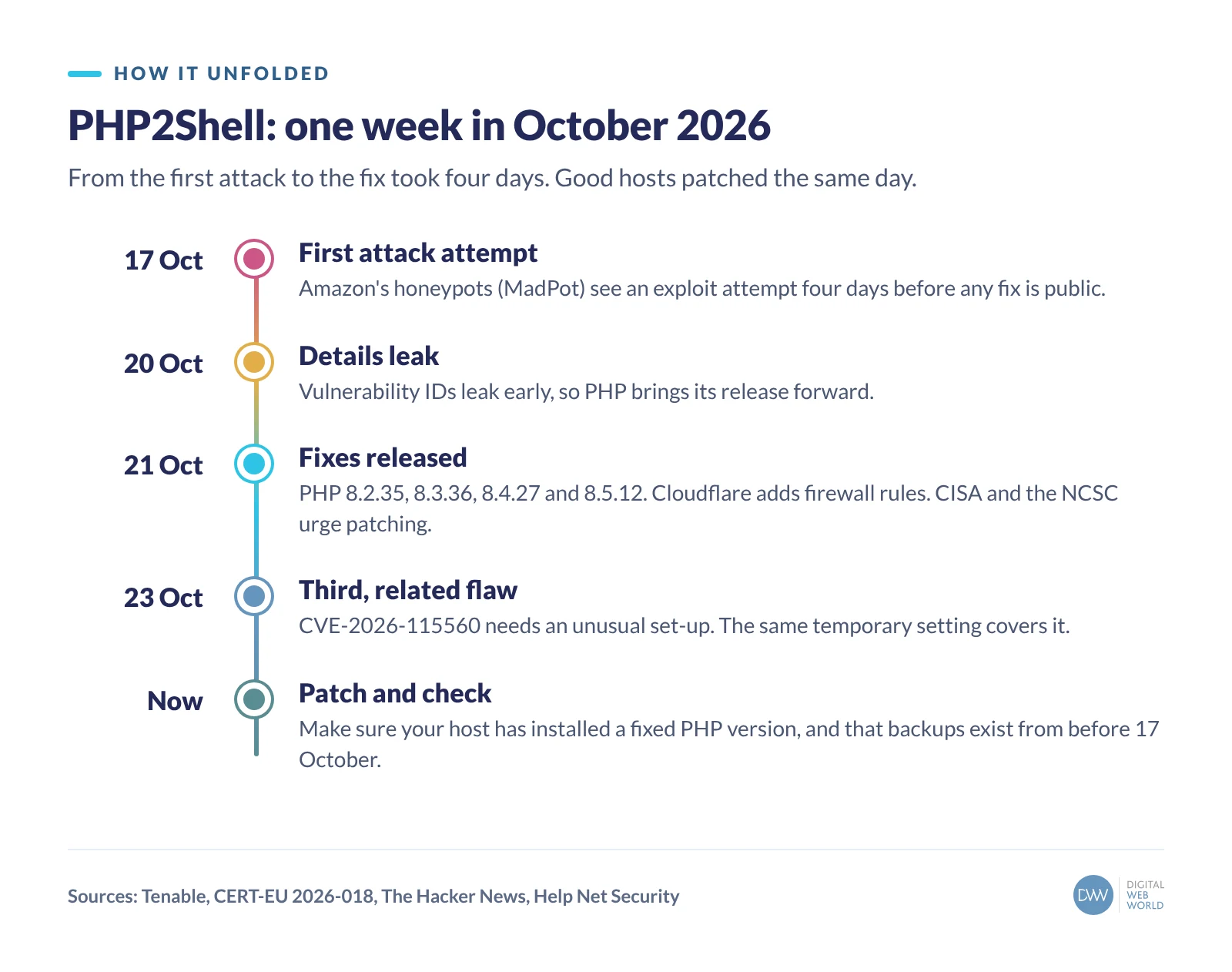
Amazon’s threat intelligence team saw an exploit attempt against its honeypot servers on 17 October, four days before the fix was public. The vulnerability IDs then leaked on 20 October, so PHP brought its release forward to 21 October. Cloudflare pushed protective firewall rules the same day, and the US cybersecurity agency CISA and the UK’s NCSC both urged people to patch straight away.
Since then, Amazon says the flaws are being exploited widely by more than one group. Researchers estimate well over a million internet-facing servers could be affected.
On 23 October PHP disclosed a third, related issue (CVE-2026-115560). It only affects sites with an unusual session set-up, PHP considers real-world risk unlikely, and the same temporary setting that protects against the second flaw covers it too.
So is my website at risk?
Honestly, for most small business websites on decent hosting, the risk this week was short-lived. Good hosts applied protective settings as soon as PHP’s advance notice came out and installed the fixed versions on 21 October. Some, such as SiteGround, said so publicly the same day.
The sites that are genuinely exposed tend to fall into one of these groups:
- Sites on old PHP. PHP 8.1 and earlier no longer get official releases. Versions 7.4 to 8.1 only have minimal source-code patches, and anything older has none. A surprising number of business sites still run on PHP 7.4.
- Self-managed servers. If you or a former developer set up a VPS and nobody is responsible for patching it, nobody has patched it.
- Cheap, unmanaged hosting where updates happen when the provider gets round to them.
- Sites with no firewall in front. Cloudflare’s emergency rules only protect traffic that goes through Cloudflare.

Three questions to ask your host today
You don’t need to understand the technical detail. You just need clear answers to these three questions, preferably in writing:
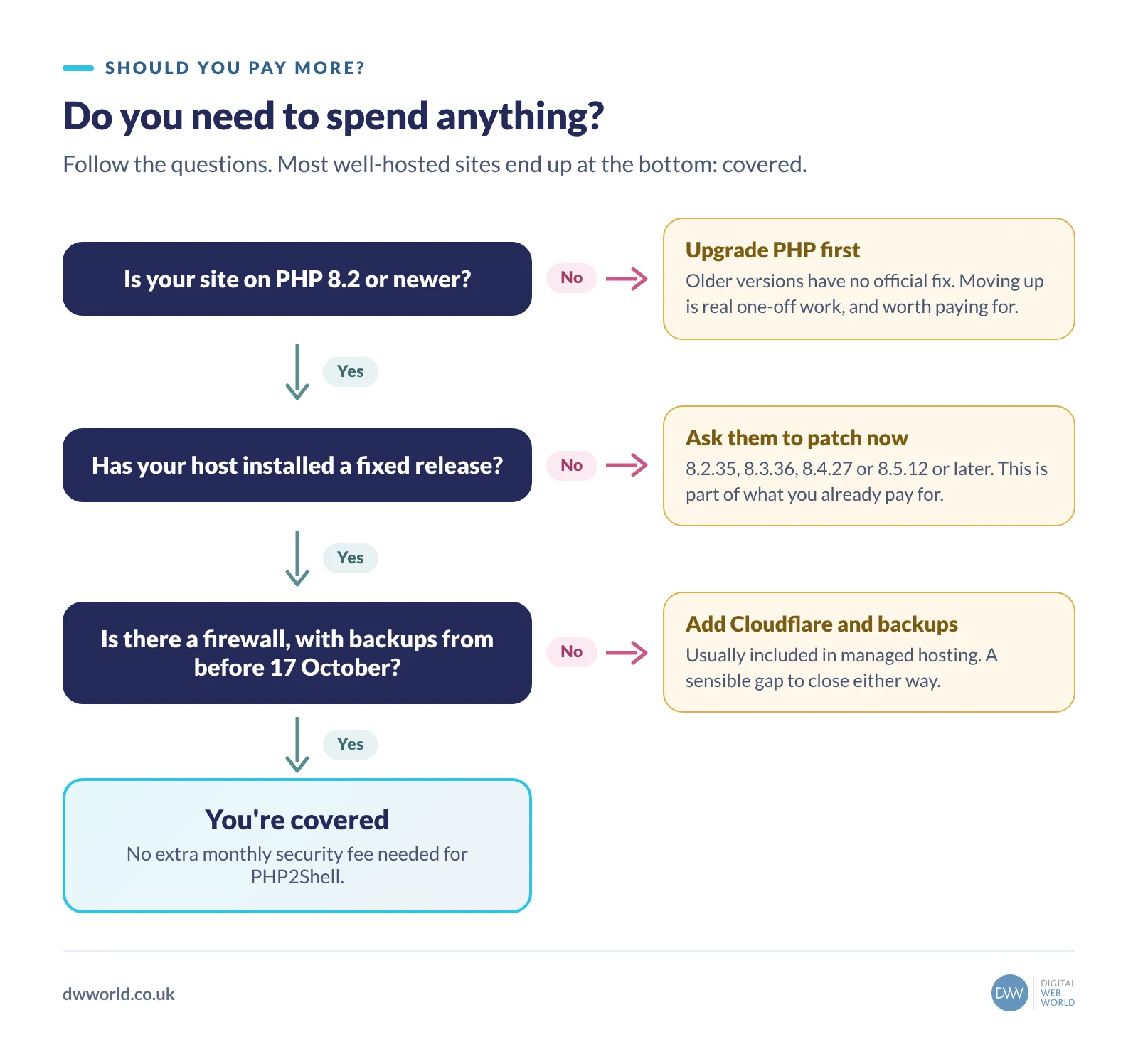
- Which PHP version is my site running, and has it been updated to a fixed release? You’re looking for 8.2.35, 8.3.36, 8.4.27 or 8.5.12 or later, or a confirmed patched build from their Linux vendor, applied on or after 21 October.
- Is my site on PHP 8.1 or older? If yes, ask what it will take to move to a supported version. That’s the real fix.
- Is there a firewall in front of my site, and do you keep backups from before 17 October? Backups from before the first known attacks are your safety net if anything turns up later.
Should you pay more for your monthly security?
This is where we’ll be blunt. Keeping PHP patched is a basic part of any hosting or managed service. It’s like a garage replacing a recalled part during a service. If your provider is now asking for an extra monthly fee, an “emergency security package” or a premium plugin to deal with PHP2Shell, ask exactly what they’ll do that they weren’t already being paid for.
There are two situations where spending money is reasonable:
- Your site is on unsupported PHP. Moving to PHP 8.3 or 8.4 can mean testing and fixing old themes and plugins. That’s a genuine one-off piece of work, and it’s worth doing anyway for speed and security.
- You run your own server with nobody looking after it. Then you either need to take on patching yourself or pay someone to manage the server. That’s not a PHP2Shell tax. It’s a gap you already had.
What you shouldn’t need is a new security plugin. Plugins run inside WordPress, which sits above PHP, so they can’t fix a flaw underneath them.
Signs your site may have been affected
Most compromised sites don’t look broken. Things worth checking, or asking your host to check, include new administrator accounts you didn’t create, unfamiliar files in your WordPress folders, unexpected redirects (especially on mobile), sudden spam emails sent from your domain and warnings in Google Search Console. If anything looks off, restore from a clean backup taken before 17 October and change all passwords.
How we can help
On our managed hosting, PHP and server patches are part of the plan, never an extra. If you’re not sure where your site stands, send us your web address and we’ll tell you which PHP version it’s on and what, if anything, needs doing.
Questions people ask
What is PHP2Shell?
PHP2Shell is the name given to an exploit chain using two critical PHP vulnerabilities, CVE-2026-109618 and CVE-2026-109619, disclosed on 21 October 2026. They let an attacker run code on a web server without logging in.
Does updating WordPress fix PHP2Shell?
No. The flaws are in PHP, the language WordPress runs on. Only updating PHP on the server to a fixed version (8.2.35, 8.3.36, 8.4.27 or 8.5.12 or later) fixes them.
Can a security plugin protect me?
Not against this. Plugins run inside WordPress, above PHP. A firewall in front of the server, such as Cloudflare’s managed rules, can block known attack patterns, but that’s a stopgap rather than a fix.
I’m on PHP 7.4. What should I do?
Treat it as urgent. PHP 7.4 has no official release with the fix, only minimal source patches. Ask your host or developer to move your site to PHP 8.3 or 8.4, testing your theme and plugins first.
Should I pay my IT company extra for this?
Not for the patch itself, which is a normal part of a hosting or managed service. Paying for a one-off upgrade from unsupported PHP is reasonable, because that’s real work.
Sources
- Tenable: PHP2Shell (CVE-2026-109618, CVE-2026-109619) FAQ
- CERT-EU Security Advisory 2026-018: Critical vulnerabilities in PHP
- The Hacker News: PHP warns of another RCE risk two days after PHP2Shell patches
- Help Net Security: PHP2Shell vulnerabilities patched
- SiteGround: Critical PHP vulnerabilities, October 2026